
You lose hundreds of hours each year fixing errors caused by poor document intake. When your intake process fails to capture and validate data upfront, downstream rework drains resources and delays operations. Building a document intake strategy using Intelligent Document Processing (IDP) can stop these costly issues before they start—streamlining workflows, reducing exceptions, and cutting cycle times. Let’s explore how to design an intake layer that saves you time and money. More information can be found here.
Designing a Document Intake Strategy
Creating an effective document intake strategy is crucial for operational efficiency. A well-designed process ensures that data is captured accurately and efficiently, reducing the need for rework and minimizing costs.
Importance of Standardization
Standardization aligns your document intake with best practices, making processes predictable and manageable. When documents follow a standard format, it becomes easier to automate their processing. This consistency helps in reducing errors and ensures that data is captured accurately every time.
Using standard templates, you can simplify data entry and minimize manual input. For example, structured forms with predefined fields can guide users to provide necessary information upfront. This reduces the likelihood of missing data and ensures that all entries are complete and uniform. In addition, by standardizing the layout of incoming documents, you make it easier for systems to recognize and process them, reducing the time spent on manual sorting.
Benefits of Automation
Automation in document intake not only saves time but also enhances accuracy. By implementing automated systems, you can ensure that data is captured directly from the source without manual intervention. This reduces human errors and speeds up the processing time, allowing your team to focus on more strategic tasks.
Automated workflows can handle repetitive tasks like data entry and sorting, freeing up your staff to focus on more critical activities. This not only boosts productivity but also helps in maintaining high data quality. For instance, automated data capture can extract information from invoices, forms, or contracts quickly and accurately, reducing the need for manual checks and corrections.
Implementing Intelligent Document Processing
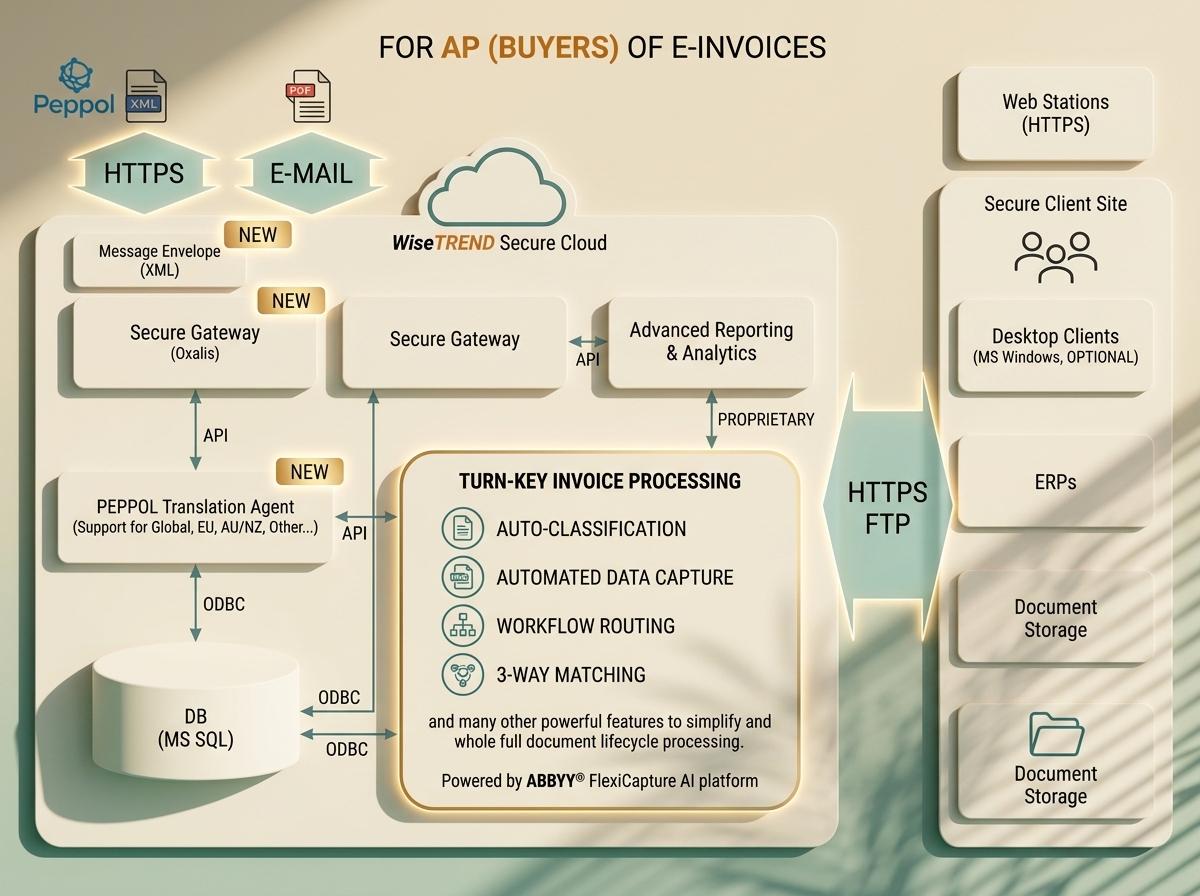
Intelligent Document Processing (IDP) plays a pivotal role in modernizing your document intake strategy. It combines advanced technologies to improve data capture and validation, ensuring high-quality outcomes.
Role of OCR in Data Capture
Optical Character Recognition (OCR) is a key technology in IDP, enabling the conversion of text from scanned documents into machine-readable data. OCR helps in extracting text from images, PDFs, and other document formats, making it easier to process and analyze.
By leveraging OCR, you can automate the capture of data from various document types, ensuring that no information is lost during the conversion process. This technology is especially useful for handling large volumes of documents, where manual data entry would be impractical. OCR enhances speed and accuracy, reducing the likelihood of errors and ensuring that data is ready for further processing.
Ensuring Data Validation and Quality
Data validation is essential to maintain quality and accuracy. IDP systems can be configured to check data against predefined rules, ensuring that it meets required standards before moving downstream. This process helps in identifying discrepancies early, reducing the need for rework later.
Implementing business rules in your IDP solution can automate checks for data consistency, completeness, and accuracy. For example, if a field requires a date, the system can automatically validate the format and range, flagging any entries that don’t comply. By incorporating these rules, you ensure that only valid data proceeds further, minimizing errors and improving overall data quality.
Reducing Downstream Rework

Efficient document intake significantly reduces downstream rework by ensuring that data is accurate and complete from the start. A robust strategy saves resources and time, allowing your organization to operate smoothly.
Streamlining Workflow Automation
Workflow automation streamlines the movement of documents through your system, ensuring that each step is executed efficiently. By automating routine tasks, you can reduce bottlenecks and improve processing times. This not only enhances productivity but also ensures that exceptions are handled promptly.
Automated workflows allow for seamless document routing, ensuring that each document reaches the right person or system for further processing. This reduces the risk of delays and ensures that operations continue without interruptions. By eliminating manual handoffs, you can significantly speed up the entire process, allowing your team to focus on more strategic activities.
Effective Exception Handling Techniques
Despite the best efforts, exceptions can occur in any process. It’s crucial to have a strategy in place to handle these efficiently. Effective exception handling ensures that issues are resolved quickly, minimizing their impact on your operations.
By setting up automated alerts and notifications, you can ensure that exceptions are addressed promptly. This allows your team to focus on resolving issues quickly, preventing them from affecting downstream processes. Additionally, by analyzing exception patterns, you can identify root causes and implement corrective measures to prevent future occurrences. This proactive approach helps in maintaining smooth operations and minimizing disruptions.
Frequently Asked Questions
What is Intelligent Document Processing (IDP)?
Intelligent Document Processing (IDP) is a technology that combines machine learning, artificial intelligence, and OCR to capture, extract, and process data from documents. It automates document handling, reducing manual input and improving data accuracy.
How does OCR improve data capture?
OCR (Optical Character Recognition) technology extracts text from images and scanned documents, converting it into machine-readable data. It enhances data capture by automating the extraction process, reducing errors, and speeding up document processing.
Why is data validation important in document processing?
Data validation ensures that the information captured meets predefined standards of accuracy and completeness. It prevents errors from propagating through your systems, reducing the need for rework and ensuring that only accurate data is used in your operations.
How can workflow automation benefit my organization?
Workflow automation streamlines the movement of documents through your system, reducing manual intervention and speeding up processing times. It enhances productivity by freeing up staff to focus on more strategic tasks while ensuring that exceptions are handled efficiently.
What are effective methods for handling exceptions in document processing?
Effective exception handling involves setting up automated alerts, analyzing patterns to identify root causes, and implementing corrective measures. This approach ensures that issues are resolved quickly, minimizing their impact on operations and preventing future disruptions.