ABBYY FlexiCapture and ABBYY Vantage can redact any field they capture. The export burns a solid bar into the image and removes the OCR text under it, so the hidden value cannot be copied back out. One capture pass produces two outputs: full data for your system of record and a redacted copy for the public, a court, a partner or a data room. WiseTREND adds a multi-AI leak review in which models from different vendors check every redacted file, and any miss is corrected and re-issued before the document is released.
Every data capture project already knows where the sensitive data is. To extract a Social Security number, ABBYY FlexiCapture or ABBYY Vantage has to find it, read it and record the exact rectangle on the page it came from. Redaction uses the same knowledge. It is one of the most useful features in ABBYY's capture platforms, and one of the least used.
WiseTREND has built ABBYY capture solutions since 2007. Five ABBYY Project of the Year awards later, redaction is often the feature clients are surprised to learn they already own. This article covers what automated redaction is, how FlexiCapture and Vantage do it, what ABBYY has shipped for it, and how WiseTREND adds multi-AI review so a redacted document is checked before anyone else sees it.
Why is redaction the most overlooked feature in data capture?
Capture projects are bought to get data out of documents: invoices into the ERP, claims into the adjudication system, applications into the case file. The redacted image is a by-product nobody asked for, so it rarely makes the requirements list.
That is a missed opportunity. Many organizations have two audiences for the same document:
- The system of record needs every value, the original image and the audit trail.
- Everyone else, including the public, a court, a partner, an auditor or an AI vendor, needs the document without the parts they have no right to see.
Most teams serve the second audience by hand: a clerk opens each PDF, draws boxes and saves a copy. It is slow, it is inconsistent, and as the court-filing failures below show, it is often not a real redaction at all. A capture workflow can produce both outputs in the same pass, with no extra handling.
Who needs redacted documents?
Transparency and privacy are not opposites. Automated redaction is how an organization publishes what it should while keeping the details it must protect.
| Use case | What gets published or shared | What gets removed | Typical rule |
|---|---|---|---|
| Public records and FOIA responses | Permits, contracts, inspection reports, correspondence | Home addresses and phones of private individuals, personal identifiers, signatures | FOIA exemption 6 and state public records laws |
| Court filings | Pleadings, exhibits, financial affidavits | Full SSNs, taxpayer IDs, birth dates, minors' names, account numbers | Federal Rule of Civil Procedure 5.2(a): last four digits, birth year and initials only |
| Healthcare records shared outside treatment | Claims, EOBs, clinical documents for research, audits or appeals | The 18 HIPAA Safe Harbor identifiers | HIPAA de-identification |
| Insurance claims sent to third parties | Loss reports, repair estimates, medical bills | Policyholder identifiers, bank details, unrelated medical history | Privacy law and contract terms |
| Loan files and data rooms | Applications, statements, appraisals | Account numbers, SSNs, employer contact details | GLBA and deal confidentiality |
| AI training and test datasets | Real document layouts | Every personal value | GDPR, CCPA and internal AI policy |
How does automated redaction work in FlexiCapture?
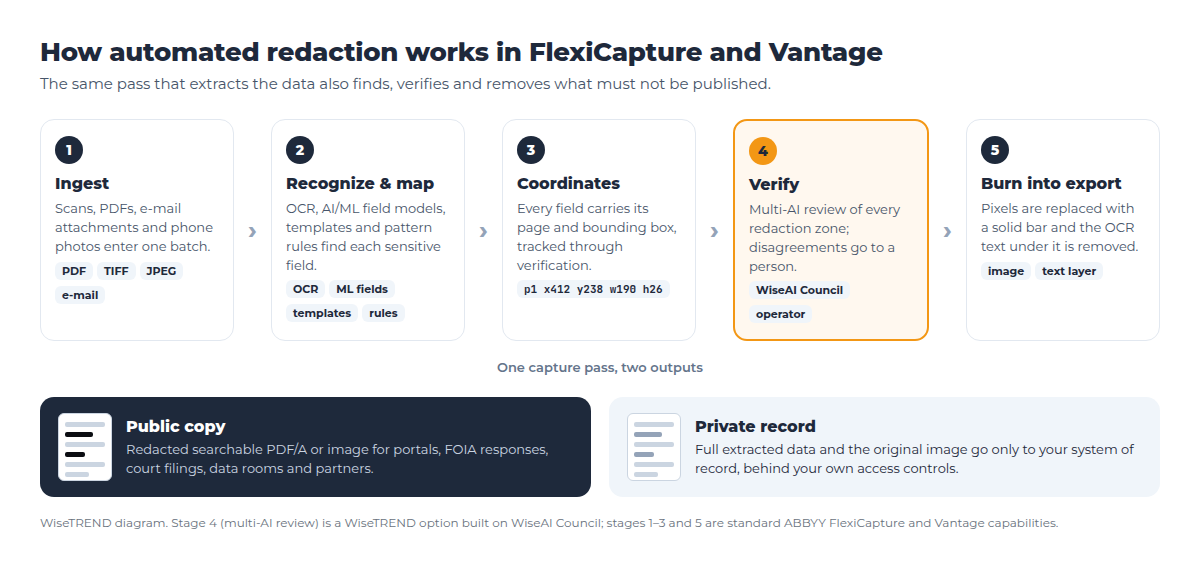
Our FlexiCapture developers describe the automated redaction process in three steps:
Recognition & Mapping: When a document is ingested, FlexiCapture automatically reads and locates the fields using AI, OCR, or predefined templates.
Dynamic Geometrical Coordinates: The system tracks the exact coordinate boundaries (bounding box) of those sensitive text regions.
Burning into Export: During the final export stage, FlexiCapture places a solid black bar over those exact coordinates on the exported PDF or image file. Crucially, it strips out the underlying OCR text metadata in that specific region, preventing unauthorized users from highlighting or copy-pasting the "hidden" text.
WiseTREND FlexiCapture development team
The word that matters most is dynamic. The redaction zone is not a fixed rectangle drawn on a template. It follows the field wherever it is found on this particular page, including on a skewed scan, a second-page continuation or a form version the project has never seen. If a verification operator corrects a field's value or region, the redaction follows the correction.
Which fields can be redacted?
Any field that FlexiCapture or Vantage captures can be redacted. A redaction policy is set per document type, so an organization chooses exactly which fields to remove for which audience:
- Whole fields, such as a phone number, e-mail address, driver license number or signature.
- Part of a field, such as every digit of an account number except the last four, or the month and day of a birth date. FlexiCapture works at the character level, so it can redact some characters of a field and leave the rest.
- Text anywhere on the page, not only in defined fields. ABBYY's own scripting examples locate a phrase in the page's full recognized text and redact the characters' rectangles.
- Non-text regions, such as a photo on an ID, a handwritten signature or a stamp, because the redaction works on image coordinates.
In FlexiCapture, the fields to redact are chosen in the image export settings (ABBYY: "You can also specify fields to redact before exporting data"). In Vantage 3.0, it is the Redact Fields Prior to Export option on the output activity of a Process Skill (Vantage 3.0 release notes).
How do AI and machine learning find the data to redact?
Redaction is only as good as detection. A field that is never found is never redacted. ABBYY platforms combine several methods, and a well-designed project uses more than one for each sensitive field:
- Templates and flexible layouts for known forms. A county permit, a CMS-1500 claim or an ACORD form has fields in predictable places, and the layout description finds them even when the scan is shifted or skewed.
- Trainable machine-learning fields for semi-structured documents. Vantage and FlexiCapture learn where a value sits from labeled examples, so an invoice or bank statement from a new sender is still covered.
- Pattern rules with validation for identifiers. A Social Security number, a payment card number or a bank routing number has a known format, and checksums such as the Luhn check for card numbers and the ABA check digit for routing numbers separate real identifiers from random digit strings.
- Language AI for free text. Names, addresses and account details inside a letter or a medical note are not in any fixed field. Language-model detection finds them in running text, and Vantage 3.0 integrates directly with generative AI models for this kind of work. ABBYY notes that Vantage lets you choose whether an LLM receives the document image or only the extracted text, which matters when the content is sensitive.
- People. Anything the automation is unsure about goes to a verification operator, who confirms or corrects the field. The redaction zone moves with the correction.
What does a redacted document look like?
The example below is a synthetic building permit application from a fictional county. A public records portal needs to publish the permit, the property address, the scope of work and the valuation. It must not publish the applicant's phone, e-mail, driver license, signature, full SSN or full bank account number.
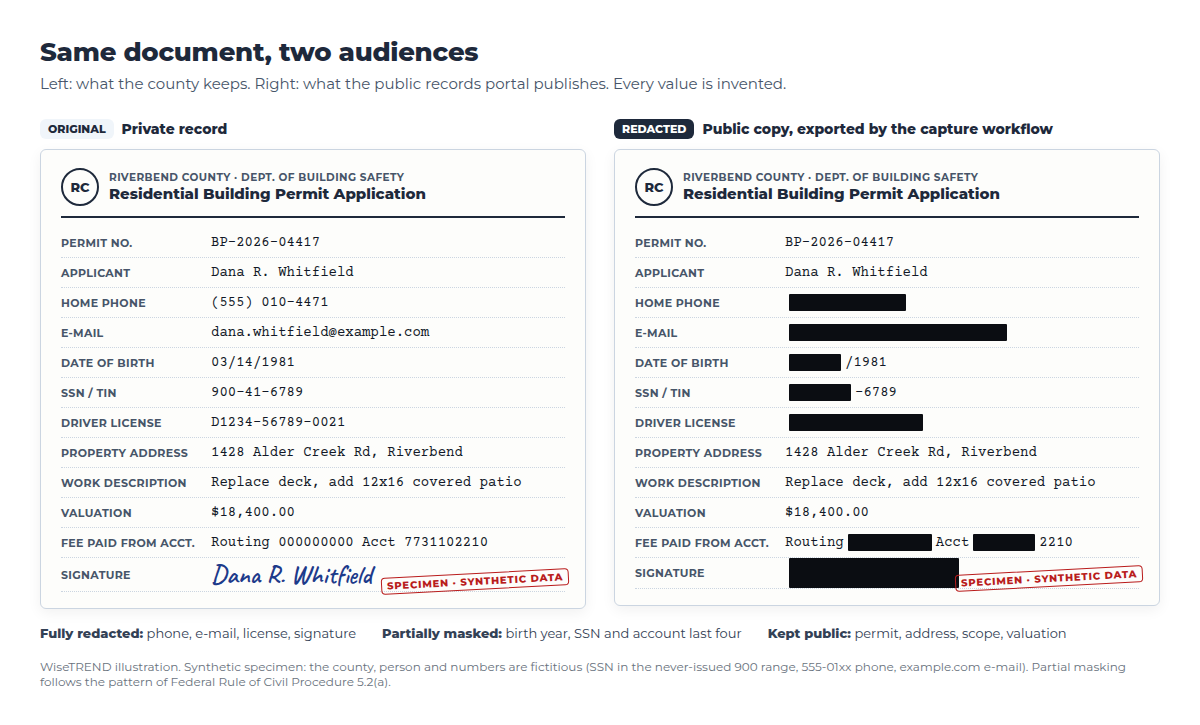
Three redaction styles are at work here:
- Full redaction of values the public never needs.
- Partial masking of identifiers, where the last four digits or the birth year are enough to tell records apart. It follows the pattern of Federal Rule of Civil Procedure 5.2(a).
- No redaction of the values the public is entitled to see. Over-redaction defeats the point of publishing.
Test data for projects like this should never be real personal data. WiseTREND's free WiseSANITIZE sample document generator produces realistic specimens with identifiers that are invalid by construction, which is how the example above was designed.
Should redaction be black or white?
Black is the familiar look, but it is not the only option. A redaction zone can be filled with any solid color. FlexiCapture's export can cover a field with a solid bar or with a custom image, so the fill is a configuration choice, not a limitation. The two most common choices are black and white:
- Black redaction makes the removal visible. Readers can see that something was withheld and roughly how much. This is the expected style for FOIA and public records responses, court filings and audit packages, where hiding the fact of a redaction would itself be a problem.
- White redaction fills the zone with the page's background color, so the document reads as a clean page. It suits public portals, reports, shared form templates, training material and AI datasets, where black bars distract and the reader does not need to know which values were removed.
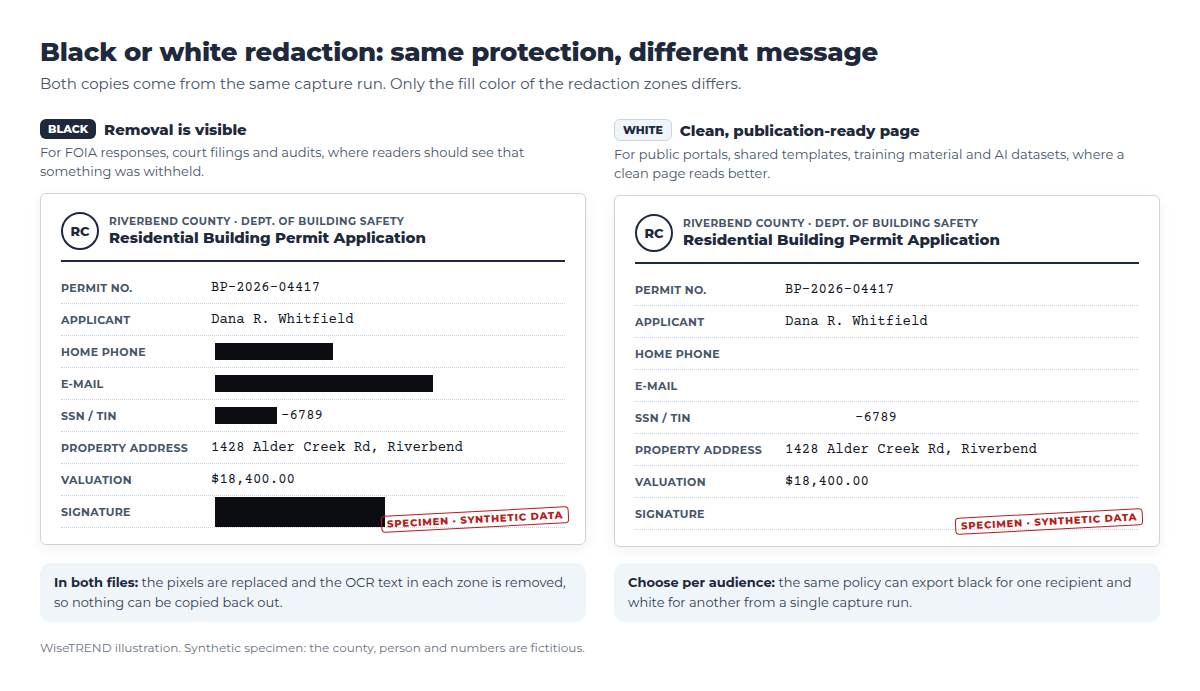
The protection is identical. In both cases the export replaces the pixels and removes the OCR text inside the zone, so a white redaction cannot be "uncovered" by changing the background or copying the text. The only difference is what the reader is told.
Two practical points:
- Choose the style per audience, not per project. One capture run can export a black-redacted copy for a records request and a white-redacted copy for a public web page from the same zones.
- Label when it matters. Where readers need to know why something was removed, the zone can carry a short label such as "REDACTED" or an exemption code like "(b)(6)" instead of a plain fill.
Why isn't a black box in a PDF a real redaction?
A PDF produced by OCR has two layers: the page image, and an invisible text layer that makes the document searchable. Drawing a black rectangle over a value hides it on screen and leaves both layers intact. Anyone can select the area, copy it and paste the "hidden" text into another document.
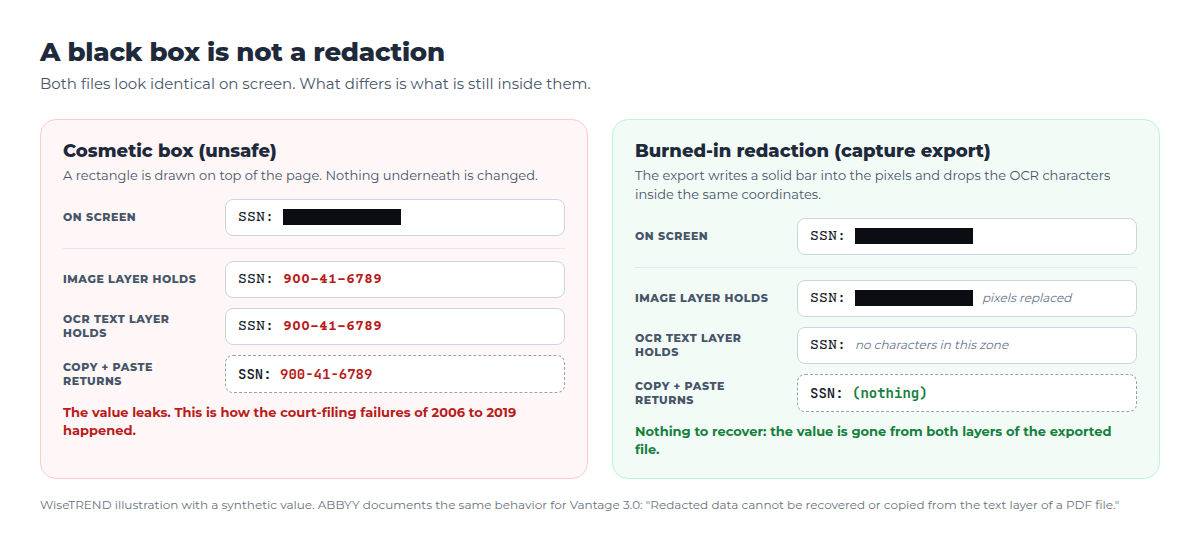
This is not a hypothetical risk. The American Bar Association's Judges' Journal catalogued redaction failures in court filings from 2006 through 2019, including a Justice Department brief, the Apple v. Samsung patent opinion and the 2019 Paul Manafort filing. In each case the text under the black boxes could be copied out.
Capture-based redaction avoids this by design. ABBYY states it plainly for Vantage 3.0: "Redacted data cannot be recovered or copied from the text layer of a PDF file."
How does multi-AI review make redaction reliable?
Burning the redaction in correctly solves half the problem. The other half is making sure every zone is in the right place and nothing was missed. One detection model, however good, can still miss a phone number written in the margin or a name inside a handwritten note.
WiseTREND adds a review step that runs on WiseAI Council, our multi-model AI service. Before a redacted file is finalized, several models from different vendors check it independently:
- Leak check. Can any protected value still be read or copied from the redacted file, in the image or in the text layer?
- Coverage check. Does the original hold a protected value that falls outside every redaction zone?
- Over-redaction check. Was public information blacked out by mistake?
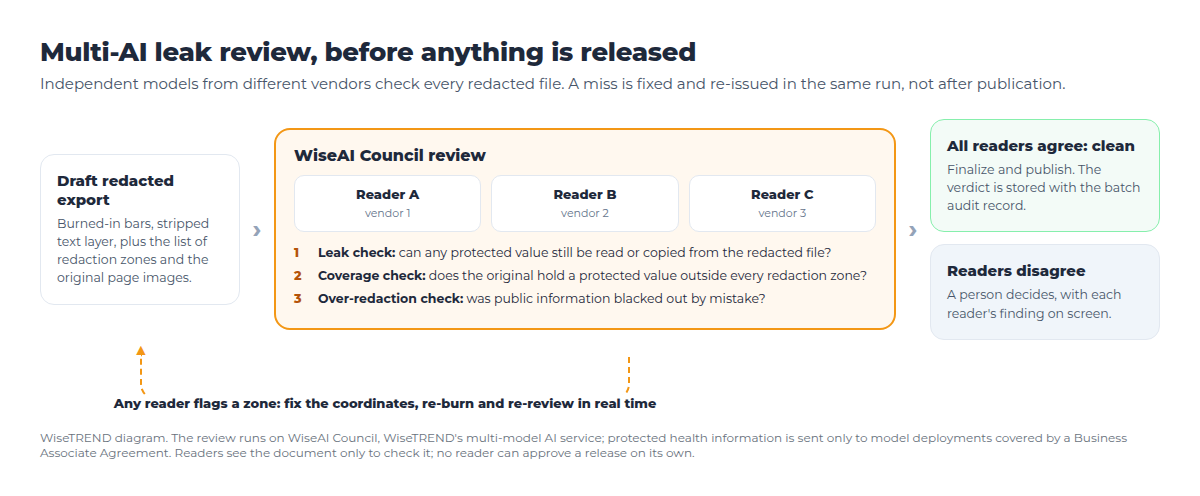
If a reader flags a zone, the document is fixed in real time before it is finalized. The zone's coordinates are corrected, the export is burned again and the new file goes back through review. Only a file that every reader agrees is clean is released, and the verdict is stored with the batch's audit record. When the readers disagree, a person makes the call with each reader's finding on screen.
Because the readers come from different model families, they tend to make different mistakes, so a value one model misses is likely to be caught by another. No reader can approve a release on its own. For health information, WiseAI Council sends documents only to model deployments covered by a Business Associate Agreement.
What has ABBYY shipped for redaction?
Redaction has been part of ABBYY's product line for more than a decade, in both desktop and enterprise products:
- ABBYY FineReader has offered removal of confidential information from PDFs since FineReader 12, and current versions include search and redact across a whole document. Both are manual, one document at a time.
- ABBYY FineReader Server includes a redaction mode in its Indexing Station for operator-driven redaction in high-volume conversion.
- ABBYY FlexiCapture 12 redacts captured fields at image export, and ABBYY's support knowledge base publishes scripting examples for redacting a field and for redacting text found anywhere on the page, including part of a field.
- ABBYY Vantage 3.0, announced January 20, 2026, introduced enterprise-grade redaction that removes sensitive data before storage or export, alongside role-based access controls and audit trails.
The difference between the desktop tools and the capture platforms is scale and repeatability. FineReader redacts the document in front of you. FlexiCapture and Vantage apply one policy to every document of a type, every time, with an audit trail.
What does WiseTREND bring to redaction projects?
WiseTREND has worked with ABBYY technology since 2007, and redaction has been part of our capture projects for years. It is where our capture expertise and our privacy engineering meet. What we have learned:
- Start with the policy, not the software. For each document type and each audience, list what is published, what is masked and what is removed. That table becomes the configuration.
- Detect every sensitive value at least two ways. A template plus a pattern rule, or a trained field plus a language model. Redaction coverage depends on detection coverage.
- Keep the original sealed. The unredacted image and data go only to the system of record. Redacted copies are generated from it and can be regenerated when a policy changes.
- Verify before release, not after a complaint. Multi-AI review and operator verification catch misses while the fix still costs nothing.
- Measure it. Track zones flagged by review, operator corrections and over-redactions per document type, and use them to improve detection.
Redaction fits alongside the rest of the Wise* line: WiseID masks document numbers on stored ID copies, WiseCLAIM handles health claims and EOBs where HIPAA identifiers are everywhere, and our IDP security readiness checklist covers the controls around it.
How do I add redaction to an existing FlexiCapture or Vantage project?
If you already run FlexiCapture or Vantage, you likely own the capability today. A typical engagement:
- Policy workshop. We map each document type to its audiences and the fields each audience may see.
- Detection review. We check that every field in the policy is found reliably, and add rules, trained fields or language-model detection where it is not.
- Export configuration. Redacted outputs, such as searchable PDF/A or TIFF, go to the public portal, e-filing system or data room, while full data continues to your system of record.
- Multi-AI review. Optional WiseAI Council leak review with real-time re-issue before release.
- Pilot on your own documents, measured field by field before rollout.
Talk to WiseTREND about redaction in your capture workflow, or about a pilot on a sample of your own documents.